Opens Without an App: 3 Medical ID QR Code Options for U.S. Patients
Compare three medical ID QR code approaches and pick one that opens without an app. Learn where to wear it, what to include, and why HIPAA ready records...
Opens Without an App: 3 Medical ID QR Code Options for U.S. Patients
The best choice is a QR-enabled medical ID, worn where responders actually look, linked to a public emergency profile you can update anytime. Three approach classes cover almost every situation: engraved QR tags or bracelets, QR-linked wearable profiles, and printed QR cards or stickers for a wallet or phone case. Pick based on three factors: visibility and placement, how easily you can update your data, and whether the code opens without a login.
TL;DR:
- QR-enabled medical IDs are most effective when placed on visible locations like wrists or necks and paired with a recognizable medical alert symbol.
- Offline QR codes encode limited data and are more durable, while online profiles support real-time updates but require a reliable data connection during scans.
- Emergency responders typically check wrist or neck wearables first, making placement and visual cues crucial for quick access to critical information.
- Verification of the code’s functionality should include testing for immediate, no-login access and the ability to disable or update the ID post-purchase.
- Maintaining up-to-date and complete medical profiles in a secure, HIPAA-ready platform ensures the data behind the QR code remains accurate and accessible during emergencies.
Table of Contents
- What Is a Medical ID QR Code and How Does It Compare to Other Options?
- How Does a QR Medical ID Work in an Emergency?
- What Should You Put in Your Medical ID QR Code Profile?
- How Do You Get a Medical ID QR Code and Set It Up?
- Is Your Medical Information Private and Secure With a QR ID?
- Where Should You Wear a Medical ID for First Responders to Find It?
- What Does a Medical ID QR Code Cost, and How Long Does It Last?
- What Should You Do If Your Medical ID QR Code Is Lost or Stolen?
- What Do Users Say About Popular QR Medical ID Providers?
- Are Medical ID QR Codes Legally Recognized by Emergency Services?
- Why a QR Code Alone Isn’t the Whole Emergency Plan
- Get Your Emergency Records Ready to Match Your QR ID
- Sources
What Is a Medical ID QR Code and How Does It Compare to Other Options?
A medical ID QR code links a wearable or card to a page that shows your critical health information the moment someone scans it. No app, no password, just a phone camera and a few seconds. That single feature separates it from older medical alert jewelry, which relies on engraved text alone and can’t be updated once it’s stamped into metal.
Not every QR product works the same way, though. Some encode your entire emergency profile directly onto the QR (functions offline), while others link to a hosted page that updates the instant you change your information but needs a data connection to load. Here’s how the three main approach classes stack up.
| Approach | Durability / materials | Profile updates | Scan access | Typical price |
|---|---|---|---|---|
| Engraved QR tag/bracelet | Stainless steel or titanium; holds up to daily wear | Fixed engraving, QR links to online profile you edit anytime | No login required if linked properly | $30 to $80 |
| QR-enabled wearable (bracelet, watch band, sleeve) | Silicone, leather, or metal; swappable bands | Real-time, edit from any device | No login, public emergency view | $20 to $60 |
| QR card, sticker, or wallet insert | Laminated plastic or vinyl; wears faster, prone to scratching | Real-time if linked to hosted profile | Depends on setup; test before relying on it | $10 to $25 |
Active people and anyone with a chronic condition tend to do best with a bracelet or watch band since it stays visible during exercise or travel. If your medications change often, prioritize a hosted profile over an engraved-only tag. Frequent travelers benefit from products that work both online and offline, since airport Wi-Fi and rental car garages are not reliable places to test a scan for the first time.
How Does a QR Medical ID Work in an Emergency?
When someone scans your code, they should immediately see the essentials: severe allergies, current medications, major conditions, implanted devices, emergency contacts, and any DNR status you’ve chosen to include. Nothing more, nothing buried behind a login screen.
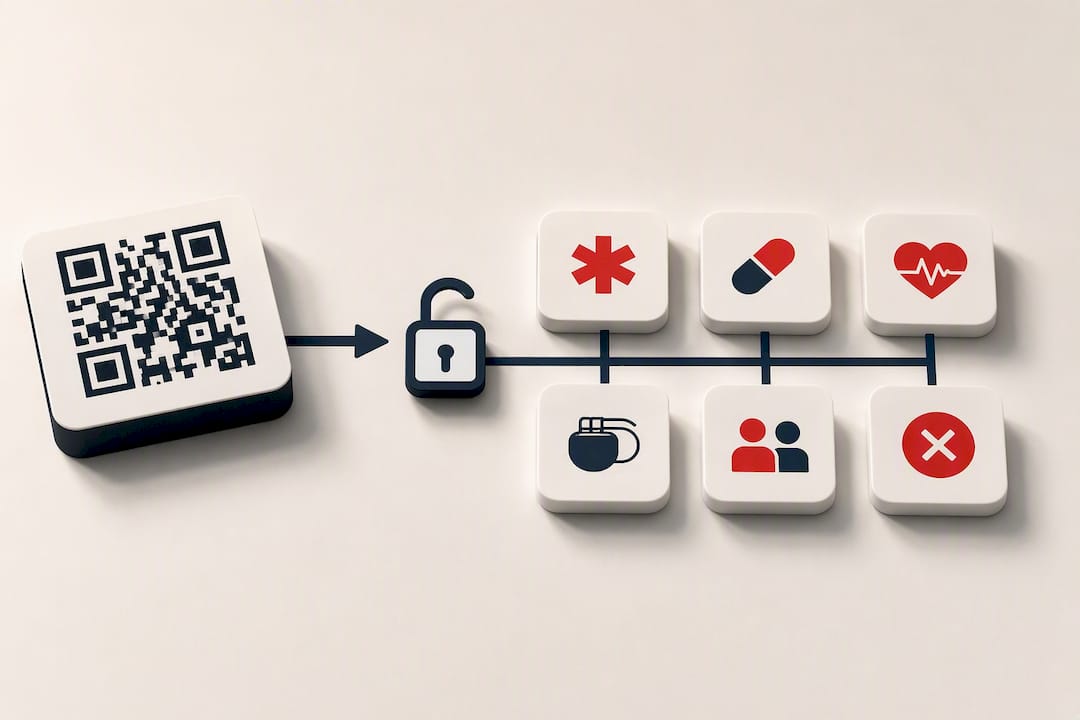
There are two technical models behind this. Some services encode your data directly into the QR code itself, so it works even without internet access. Others link to an online medical profile that updates instantly whenever you change your information, but requires a data connection to load. Each has a trade-off: offline QR codes are more limited in how much they can hold, while hosted profiles support unlimited detail and real-time edits.
No-login access is not optional. If a scan routes to an app download or a marketing page instead of your emergency data, the whole system fails at the worst possible moment. Run this test after setup:
- Scan your own code with a different phone than the one you set it up on.
- Confirm it opens without asking for a password or app install.
- Check that allergies and medications appear within the first screen, not after scrolling.
What Should You Put in Your Medical ID QR Code Profile?
Emergency responders often have less than a minute to assess a patient before deciding on treatment, which is exactly why step-by-step emergency guidance stresses fast access to key facts over a full chart review. Populate these fields first, in this order:
- Severe allergies, especially drug allergies that could cause anaphylaxis.
- Current medications, dosages included.
- Major conditions such as diabetes, epilepsy, or heart disease.
- Implanted devices like pacemakers or insulin pumps.
- Emergency contacts with phone numbers, not just names.
- Primary physician’s name and practice.
Attach a recent medication list or key prescriptions if your platform supports document uploads. Keep anything sensitive but non-urgent, like mental health history or unrelated past surgeries, out of the public view. Format the top of your profile in short, labeled lines. A responder skimming a phone screen under stress needs “Penicillin allergy” in bold, not a paragraph.
How Do You Get a Medical ID QR Code and Set It Up?
You can buy a QR medical ID through a few different channels: specialist medical ID retailers like MedicAlert, general online marketplaces, custom jewelers who can engrave a QR onto a bracelet, or gift shops inside hospitals and clinics.
Before you buy, verify these things at checkout:
- The code opens to a public emergency view, not a login screen.
- You can update the profile after purchase, not just at setup.
- There’s a way to disable and reactivate the code if it’s lost.
- Materials and sizing suit how you’ll wear it daily.
Setup itself is straightforward: create your profile, enter your priority data starting with allergies and medications, link the QR code to that profile, and test the scan yourself using a standard phone camera, no special app needed. Once confirmed, look for a dashboard option to disable the code if it’s ever lost. Skipping that last step is the single most common mistake buyers make.
Is Your Medical Information Private and Secure With a QR ID?
There’s a real tension here: you want your emergency data visible to a stranger with a phone, but not to anyone browsing the internet. The fix is a platform that separates a limited public-facing emergency view from your full medical records, which stay private and accessible only to you.
“HIPAA-ready” is a term you’ll see often, and it usually means the vendor uses encryption and access controls modeled on healthcare privacy standards, even if the company itself isn’t a covered entity under HIPAA. Ask directly: Is data encrypted in transit and at rest? Who can access the full profile versus the emergency view? Medfiles is a useful benchmark for what to expect.
- Confirm the emergency view shows only what you choose, not your entire file.
- Ask how disable and reactivate works if the physical ID is lost.
- Check whether you can audit who viewed or edited your profile.
Pro Tip: Set a calendar reminder every six months to rescan your own code. Medications change, phones change, and a QR that worked last year can silently break.
Where Should You Wear a Medical ID for First Responders to Find It?
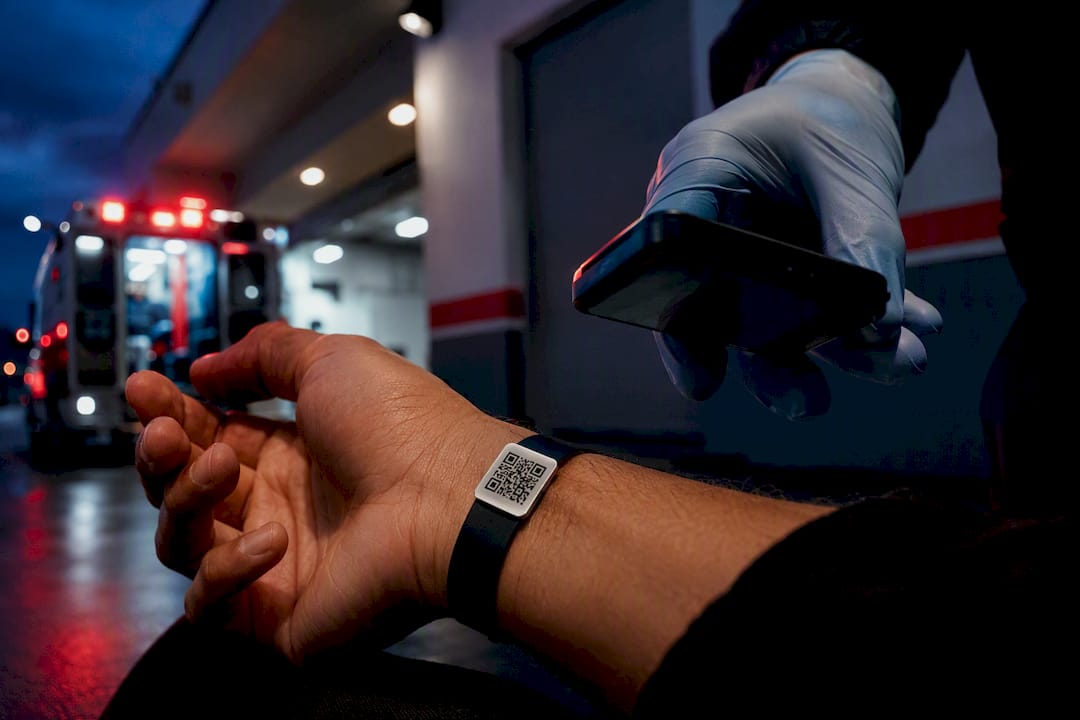
First responders are trained to check the wrist and neck first when assessing an unconscious or unresponsive patient, which is why MedicAlert notes that QR placement on those two spots raises the odds of a scan considerably. A QR code buried in a wallet or backpack often goes unnoticed until well after initial treatment decisions are made.
Pairing your QR with a visible medical alert symbol, like the Star of Life, prompts responders to scan in the first place. A code with no visual cue can be mistaken for a random sticker and ignored entirely.
Test your setup in different lighting conditions since glare and low light both affect how reliably a phone camera reads a QR code. And if scanning fails for any reason, an engraved name or condition on the metal itself still gives responders something to act on immediately.
What Does a Medical ID QR Code Cost, and How Long Does It Last?
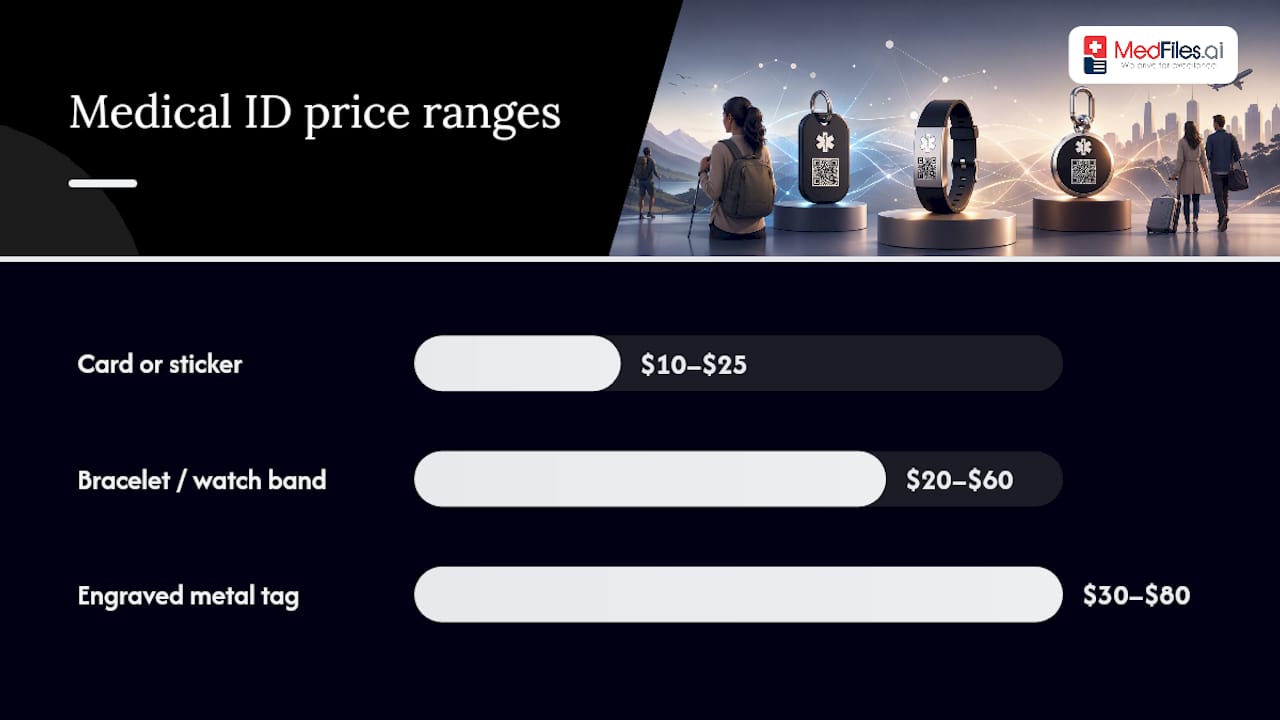
Expect to pay $10 to $25 for a basic QR card or sticker, $20 to $60 for a QR-enabled bracelet or watch band, and $30 to $80 for an engraved metal tag with a linked QR. Adding features like GPS tracking pushes costs higher, though most buyers don’t need that for a basic emergency ID.
Durability varies by material. Stainless steel and titanium tags last for years with minimal wear, while laminated cards and stickers scratch and fade faster, especially with daily pocket or wallet friction. Replace any QR code once it’s visibly scratched or scuffed enough to affect scanning.
Build a habit of reviewing your profile every few months and re-testing the scan, the same way you’d check a smoke detector battery.
What Should You Do If Your Medical ID QR Code Is Lost or Stolen?
Act in this order:
- Disable the code immediately through your vendor’s dashboard or support line, since most hosted QR services include a disable and reactivate feature built for exactly this situation.
- Order a replacement and link it to a new or reactivated profile, then test the scan before you start relying on it again.
- Review your profile contents for anything sensitive, and update emergency contacts if circumstances have changed.
Speed matters here. A lost ID that’s still active is a bigger privacy exposure than a temporary gap in coverage while you order a new one.
What Do Users Say About Popular QR Medical ID Providers?
Buyers researching this category consistently gravitate toward a handful of recognizable names, and it’s worth understanding what each one is actually known for before you commit to one.
MedicAlert built its reputation on first-responder recognition. Because MedicAlert has operated as a medical ID organization for decades, many EMS and hospital staff are trained to specifically look for its branding, which gives its QR-enabled medical IDs an edge in real-world scan-and-recognize scenarios, not just online reviews.
MyID takes a different angle, focusing on flexibility across form factors. Its core medical ID bracelets and products appeal to buyers who want a straightforward engraved option with a linked QR. The MyID Sleeve extends that idea to wearables you already own, fitting over an Apple Watch, Fitbit, or similar band so you don’t need a separate bracelet. Buyers who dislike wearing two things on one wrist tend to prefer this format.
The MyID Hive bracelet gets attention for its more casual, everyday look, aimed at people who want something that doesn’t read as overtly medical. And the MyID Pod necklace connector solves a specific complaint: people who don’t want anything on their wrist at all, letting them clip a medical ID pod onto a necklace or bag strap instead.
Across these products, the recurring theme in buyer feedback is simple: people care most about whether the code actually opens fast, without demanding an app or login, and whether updating their information is genuinely quick. Products that fail on either point tend to draw the sharpest criticism, regardless of how the jewelry itself looks or feels.
Are Medical ID QR Codes Legally Recognized by Emergency Services?
There’s no single global law mandating that emergency responders check medical ID QR codes, but that doesn’t mean they’re ignored. In the United States, EMS training generally includes checking for medical alert jewelry at the wrist and neck as a standard part of patient assessment, which is why placement matters so much more than most buyers expect going in.
Recognition varies more by convention than by statute. Organizations like MedicAlert have spent years building relationships with hospitals and EMS agencies, which is partly why their branding carries extra weight in the field. A generic QR sticker from an unfamiliar brand may still work technically, but it lacks that same built-in recognition among responders who’ve been trained to look for specific symbols.
What actually matters most, regardless of jurisdiction, is whether your code resolves to genuinely usable data without friction. No law requires a company to make its QR service work without a login, but products that fail this test undermine the entire purpose of wearing one. If you travel internationally, keep in mind that data privacy rules differ by country. A platform built with encryption and controlled access in mind, the way HIPAA-ready services in the U.S. are designed, gives you a reasonable baseline of protection even outside U.S. borders, though it’s worth confirming with any vendor how they handle cross-border data storage before you rely on it while abroad.
Why a QR Code Alone Isn’t the Whole Emergency Plan
A QR code on your wrist is only as good as the data behind it, and that’s the part most buyers underestimate. The jewelry is the easy decision. Keeping the profile behind it accurate, complete, and genuinely accessible is the harder ongoing job, and it’s the one people quietly neglect after the initial setup excitement fades.
The bigger opportunity here isn’t a better bracelet. It’s connecting that QR code to a fuller medical record, so a responder or new doctor scanning your wrist can see not just your allergy list but your actual recent lab work, prescriptions, and imaging if they need it. A platform built for instant emergency access does more than a static profile ever could, because it grows with your medical history instead of staying frozen at whatever you typed in during setup. HIPAA-ready infrastructure and end-to-end encryption matter here too, not as a checkbox, but because the whole point of an emergency profile collapses if the data behind it isn’t actually secure. Multi-profile support extends the same protection to family members and dependents who can’t set up their own.
Use a vendor-hosted emergency view for the fast, first-glance essentials. Use a fuller records platform for everything else a responder or new provider might eventually need.
— Team
Get Your Emergency Records Ready to Match Your QR ID
A QR code on your wrist only works if what’s behind it is complete and current. Medfiles gives you a HIPAA-ready home for the deeper medical history that a wearable profile alone can’t hold, lab results, prescriptions, imaging, and provider notes, all organized automatically and ready to share the moment someone needs them.
Start with the emergency ID page to see how instant access works without an app or login, then check security and privacy to understand exactly how your data stays encrypted. If you’re setting up records for yourself or a family member, Medfiles for patients walks through creating a profile and linking documents. Once your account is live, test it the same way you’d test any QR medical ID: scan it, confirm it loads fast, and check that the right information shows up first. Create your free account today and get your records emergency-ready before you need them.
This article is general information, not a substitute for advice from a qualified doctor. Consult a qualified healthcare professional about your own circumstances before acting on anything here.