6-Step Plan to Combine Medical Records for Patients, Preserve Metadata
Use a HIPAA-ready, 6-step process to combine your medical records, preserve metadata, and keep a searchable audit trail. Includes checklist, format and...

6-Step Plan to Combine Medical Records for Patients, Preserve Metadata
The fastest, most reliable way to combine medical records is to connect directly to each provider’s patient portal or request a bulk EHI export, then pull everything into one HIPAA-ready personal health record with an audit trail. Success looks like one searchable, chronological file with provider tags and a clear permissions log. Your first move: build a quick inventory of every provider you’ve seen and connect to your primary portal today.
TL;DR:
- Connecting directly to provider portals using FHIR standards is the fastest method for recent records, but older records often require manual requests or bulk exports.
- A structured process of inventorying providers, requesting records, standardizing files, and maintaining an audit trail ensures a usable and accurate consolidated health record.
- Requesting clinical data in structured formats like CCDA or FHIR, and imaging in DICOM, significantly increases the utility of your records over simple PDFs.
- Encrypting files, using secure sharing methods, and documenting all transmissions are essential to maintain HIPAA-compliant privacy and security.
- For large or unresponsive providers, third-party retrieval services can streamline extraction, but a purpose-built platform offers automated organization, AI assistance, and reliable audit logs.
Table of Contents
- What Are the Main Ways to Gather Records From Multiple Providers?
- How Do You Actually Build a Combined Record, Step by Step?
- What Do CCDA, FHIR, and DICOM Actually Mean for Your File?
- What Are Your Privacy Rights When Sharing Combined Records?
- What Should Your Consolidation Checklist Include?
- Why a Structured Workflow Beats a Folder of PDFs
- Medfiles Turns Your Request Log Into a Living Health Record
- Where to Verify the Technical and Clinical Standards
- Sources
What Are the Main Ways to Gather Records From Multiple Providers?
You have four real paths to pull records together, and most people end up using two or three of them depending on how old the records are and how cooperative each office turns out to be.
Patient portal connections are the fastest option for anything recent. Most hospital systems and clinics now run on platforms that support FHIR-based patient access, a technical standard that lets you authorize a third-party app to pull your records directly from the provider’s system instead of you downloading and re-uploading files by hand. You log in once, grant permission, and the data flows through a secure connection.
Direct requests to the Health Information Management (HIM) office work for older records or providers without a modern portal. You’ll typically need a signed authorization form, a photo ID, and the exact date range you want. Turnaround varies wildly by office, so build in buffer time.
Bulk EHI exports are a newer option. Federal rules now require certified health IT systems to offer a “download my data” function that hands over your full Electronic Health Information (EHI) set, not just a summary.
Third-party connector services sit between you and multiple provider systems, using aggregation layers built on FHIR and USCDI standards to pull structured data from many systems through one authorization flow instead of you contacting each office separately.
- Manual collection — scanning paper charts, requesting DICOM files for imaging, calling old offices — is slower but sometimes the only option for records predating electronic systems.
How Do You Actually Build a Combined Record, Step by Step?
Gathering files is only half the job. Without a repeatable process, you end up with a folder of mismatched PDFs and no way to tell what’s missing.
- Build a provider inventory. List every provider you’ve seen in the last five to ten years, along with the date range and record types you need from each (visit notes, labs, imaging, prescriptions).
- Pick a retrieval method per provider. Portal connection for active relationships, direct HIM request for closed or older practices, bulk export where available.
- Submit requests and log everything. Record the date sent, request ID or confirmation number, and expected delivery date for each provider. This log becomes your audit trail.
- Standardize what comes back. Rename files consistently (provider, date, record type), preserve original metadata, and run OCR on any scanned document so it becomes searchable text instead of a static image.
- Merge into one chronological container. Build a single timeline with an index that tags each entry by provider and record type, so anyone reviewing it later can trace where each fact came from.
- Run a quality check. Compare what you received against your original inventory, flag gaps, and keep the request log as your permanent record of what was shared and with whom.
A structured, trackable process like this is consistently what separates a usable combined file from a pile of scanned attachments, according to guidance from record-retrieval specialists who handle this professionally.
Pro Tip: Keep your request log in a separate document from the medical records themselves. If you ever need to prove you followed a proper authorization process, that log is your evidence.
What Do CCDA, FHIR, and DICOM Actually Mean for Your File?
Not all exports are created equal, and the format you receive determines how useful your combined record will actually be.
A FHIR bundle or CCDA (Consolidated Clinical Document Architecture) file carries structured, machine-readable data: discrete lab values, coded diagnoses, medication lists with dosages. A flattened PDF of the same visit summary often loses that structure entirely, turning searchable data into a static image of text.
For imaging specifically, always request the DICOM files rather than a PDF export of your scans. Patients requesting radiology records should specifically ask for DICOM format because it preserves diagnostic resolution and metadata that a flattened PDF strips out, which matters if another specialist ever needs to review the actual images.
Scanned paper documents lose metadata too, so run OCR whenever possible to make them text-searchable.
- Ask for exports “in the most structured format available” rather than just “records”
- Request CCDA or FHIR for clinical summaries, DICOM for any imaging
- Keep file names consistent: provider, date, document type
- Preserve original files rather than only keeping converted PDFs
Understanding medical record interoperability helps explain why some providers hand over rich, structured data while others only offer a printout.
What Are Your Privacy Rights When Sharing Combined Records?
Under HIPAA, you have a legal right to access your own medical records, and providers generally must fulfill requests within 30 days, with one possible 30-day extension. Every time you share your consolidated file, document who received it, when, and why. That log protects you if a dispute ever comes up later.
Integrating structured records across care settings measurably improves continuity, cutting average specialist wait times by an average duration shown in one cohort study, which is a strong reason to preserve structured formats rather than flattening everything to plain PDFs.
- Encrypt your combined file at rest, not just in transit
- Use secure, expiring share links or password-protected files instead of standard email
- Request certified copies when a record needs legal weight
- Submit correction requests in writing if you spot an error in what a provider sent
Review security and privacy practices built for HIPAA-ready storage before you settle on where your combined file will live long-term.
What Should Your Consolidation Checklist Include?
A one-page tracker keeps the whole process honest. For each provider, log: name and contact, date request sent, fulfillment date, file format received, and a note on whether imaging came as DICOM or PDF. Check off inventory completion, request tracking, format standardization, and a final quality pass against your original list.
| Tool category | Best for | Watch for |
|---|---|---|
| Personal health record platform | Long-term storage, indexing, sharing | HIPAA-ready infrastructure, audit logs |
| Secure cloud storage with logs | Storing sensitive files with access history | Encryption at rest, permission tracking |
| OCR/cleanup utilities | Making scanned PDFs searchable | Accuracy on handwritten notes |
| Specialist retrieval service | Old records, uncooperative offices, large volumes | Cost per request, turnaround time |
Paying for a retrieval service usually makes sense when you’re chasing records from five or more offices, or when a provider has gone unresponsive for weeks. Meanwhile, preparing your documentation with a clear, concise one-page medical history summary can streamline the process and help new doctors quickly understand your care background. A one-page medical history summary is also worth building alongside your full file, since it’s what most new doctors actually want to see first.
Why a Structured Workflow Beats a Folder of PDFs
We’ve watched people try to combine records by dragging PDFs into one folder, and it almost always falls apart the same way: duplicate documents nobody catches, scanned pages with no searchable text, and no record of who shared what with whom.
A purpose-built system fixes this by preserving metadata automatically and logging every share. That’s the difference between a file you can hand to a new specialist with confidence and one you’re still apologizing for.
— Team
Medfiles Turns Your Request Log Into a Living Health Record
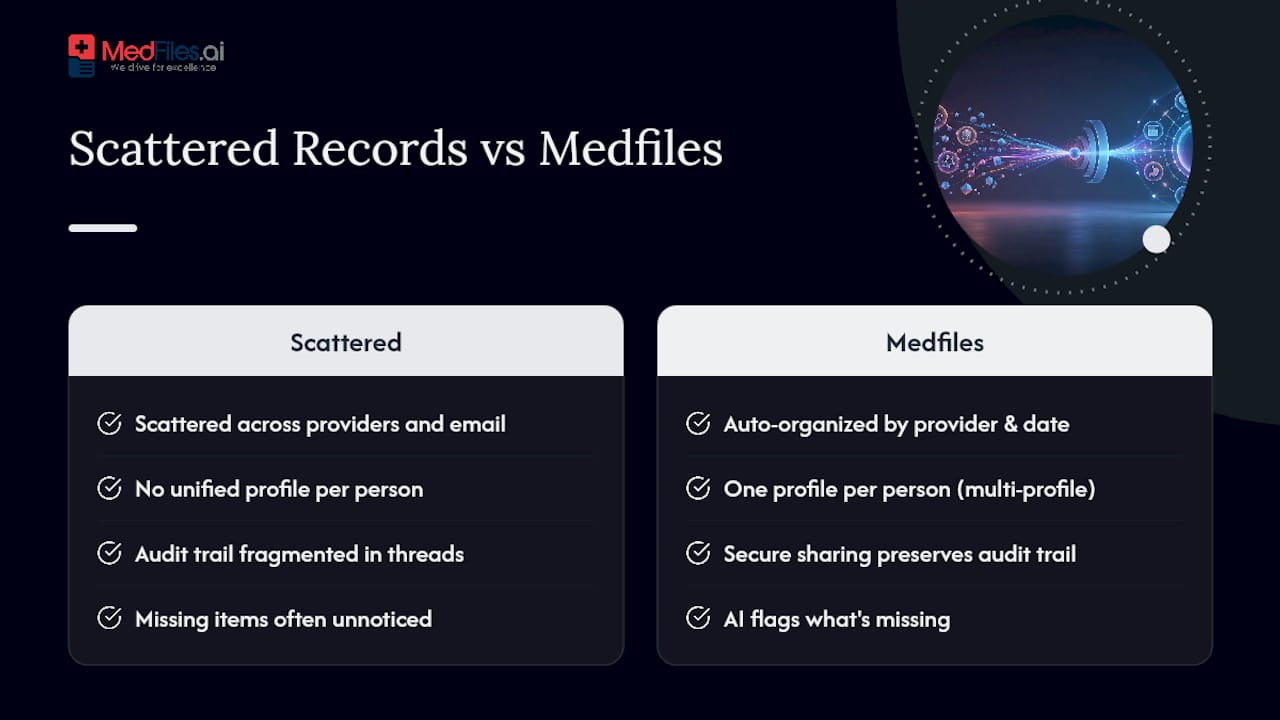
A dedicated platform can provide a HIPAA-ready home to consolidate your records: automatic organization by provider and date, AI-assisted analysis that flags what’s missing, and secure sharing links that keep your audit trail intact instead of scattered across email threads.
Families juggling multiple kids’ pediatricians, caregivers managing a parent’s specialist visits, and travelers who need emergency access from anywhere all benefit from having one profile per person instead of one login per provider. Some platforms support multi-profile management, so a household with several ongoing care relationships doesn’t need five separate systems.
Start a free trial with no credit card required, upload your first batch of records, and see your combined document storage take shape in minutes rather than weeks.
Where to Verify the Technical and Clinical Standards
For the technical details behind merging patient data, HL7 FHIR’s merge operation documentation explains how source and target identifiers stay linked. For the clinical case, the JMIR cohort study on EMR integration documents measurable continuity-of-care gains. For hands-on retrieval steps, Record Retrieval Solutions’ guide walks through the request process in more detail.
Sources
- The Benefits of Integrating Electronic Medical Record Systems Between Primary and Specialist Care Institutions: Mixed Methods Cohort Study
- How to Combine Medical Records From Multiple Providers Into One File | Record Retrieval Solutions